

Pages > Create
Tokens (Dynamic Text)
Dynamic placeholders add real values like a visitor's location, the date, or a URL parameter.
Overview
Tokens are dynamic placeholders you can insert into any text on a page or quiz. When a visitor loads the page in staging or production, each token is automatically replaced with the relevant value, such as their location, the date, or a URL parameter. This lets you personalize page content.
The Agent may add Tokens on your behalf, but you can also insert them manually.
Inserting a Token
While editing any text element, type {{ to open the token picker. Available tokens include:
| Token | Replaced with |
|---|---|
Keyword | A search keyword or custom URL parameter value |
Search Param | Any query parameter from the URL |
Date | The current date |
Month (Full) | e.g. June |
Month (Short) | e.g. Jun |
Day | The current day number |
Year | The current year |
Day of Week (Full) | e.g. Monday |
Day of Week (Short) | e.g. Mon |
Country | Visitor's country |
Region | Visitor's region or state |
City | Visitor's city |
Once inserted, the token appears highlighted in blue in the editor. In the editor's view/preview mode the token may show as blank, this is expected. On staging and production it will be replaced with the correct value.
Configuring a Token (Pages Only)
On pages (not quizzes), you can click any blue token in the editor to open a configuration popup with two options:
- Fallback value — the text shown if the token cannot be resolved (e.g. if the visitor's location is unavailable, show "USA".)
- Rule mapping — define replacement rules so specific token values display as something else
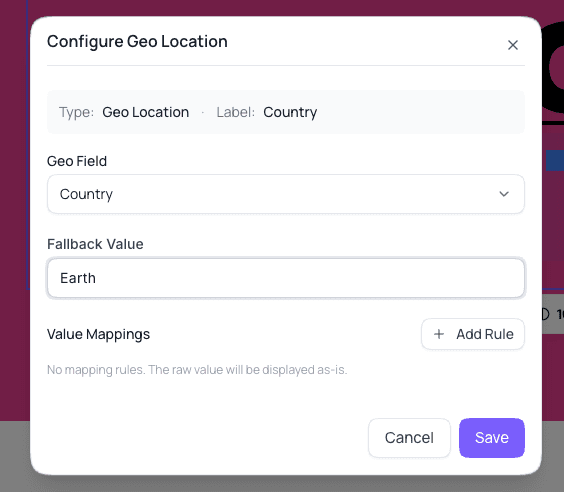
To add a rule, click + Add Rule. A row will appear where you can set what a token value should be replaced with. For example:
Token value
usa→ display asUnited States
You can also enable regex matching to match token values using a regular expression pattern and replace them with a hardcoded string.
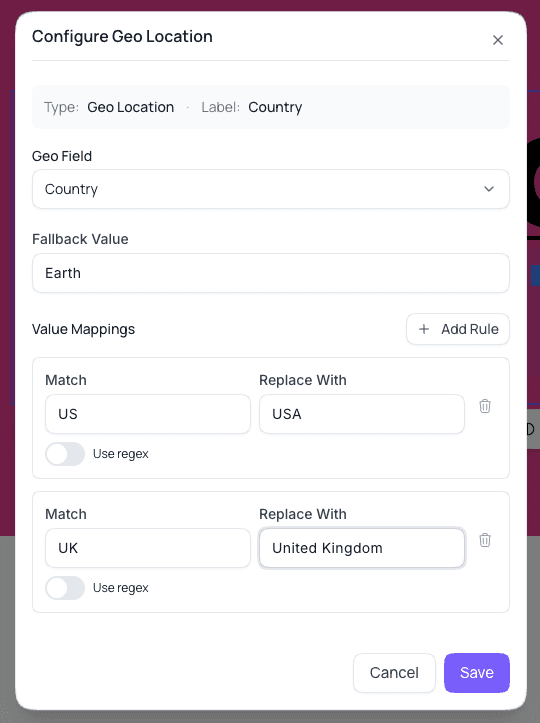
Click Save after adding or updating any fallback value or rules.
Summary
Tokens let you personalize page and quiz copy with real visitor data, like location or a URL parameter, without writing custom code. Configure a fallback value and rule mapping on pages to control exactly what displays when a token can't be resolved.