

Pages > Experiment
Smart Traffic
Route visitors to the right page variant automatically based on their location, device, ad source, and more.
Overview
Smart Traffic lets you define rules that control which variant of a page a visitor sees. Instead of showing everyone the same version, you can route traffic based on where visitors are coming from, what device they're on, or which ad or campaign brought them to the page.
This is useful for personalising the experience — sending visitors from a specific country to a localised variant, routing mobile users to a mobile-optimised design, or matching the page to the exact ad or campaign a visitor clicked.
Rules can be combined so that a variant is only shown when all conditions are met. If no rules match a visitor, traffic is distributed equally across all active variants.
Alternative: link an ad straight to a variant
If a variant has its own subpath, it has a direct URL you can point an ad at, so that ad's traffic doesn't need a Smart Traffic rule at all.
What this guide covers
- Opening the Smart Traffic rules for a variant
- Configuring rule types
- Saving and activating the rules
Configuring Smart Traffic Rules
Open your page
Go to Pages from the left sidebar and click the page you want to configure.
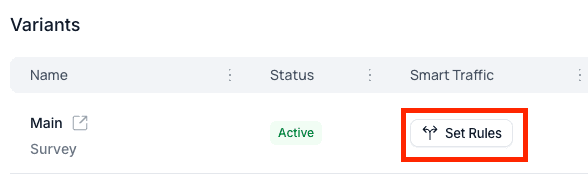
Open Smart Traffic for a variant
Find the variant you want to target and click Set Rules under the Smart
Traffic column.
The Smart Traffic Rules configuration panel will open.
Configure your rules
Add one or more conditions to determine when this variant is shown. Available rule types:
Keywords — show this variant only for visitors arriving via specific search keywords.
Devices — target by device type: All Devices, Mobile, Tablet, or Desktop.
Ads — route traffic from a specific ad.
Ad Groups — match traffic from a specific ad group.
Campaigns — route visitors arriving from a selected campaign.
Countries — target visitors from specific countries.
Regions / States — narrow targeting to a regional or state level.
Cities — target visitors from specific cities.
All conditions use AND logic — every selected condition must match for the variant to be shown.
Save the rules
Review your configuration and click Update to activate the rules.
Summary
Smart Traffic rules are applied on every visit. When a visitor matches all conditions set for a variant, they are routed to it automatically. If no rules match, the default variant is shown.
Once you have variants running with Smart Traffic routing your audiences, head to Experiments to set up A/B tests using variations within a variant to measure which design performs best.