
Documentation
How to Export Analytics From Superfunnel
You can export analytics data from Superfunnel to analyze performance, share reports, or import the data into your BI tools. Exports are available directly from the Dynamic Pages dashboard.
What You Can Export
You can export data such as:
• Visitors
• Conversions
• Conversion rate
• Button clicks
You can also segment and group the data before exporting.
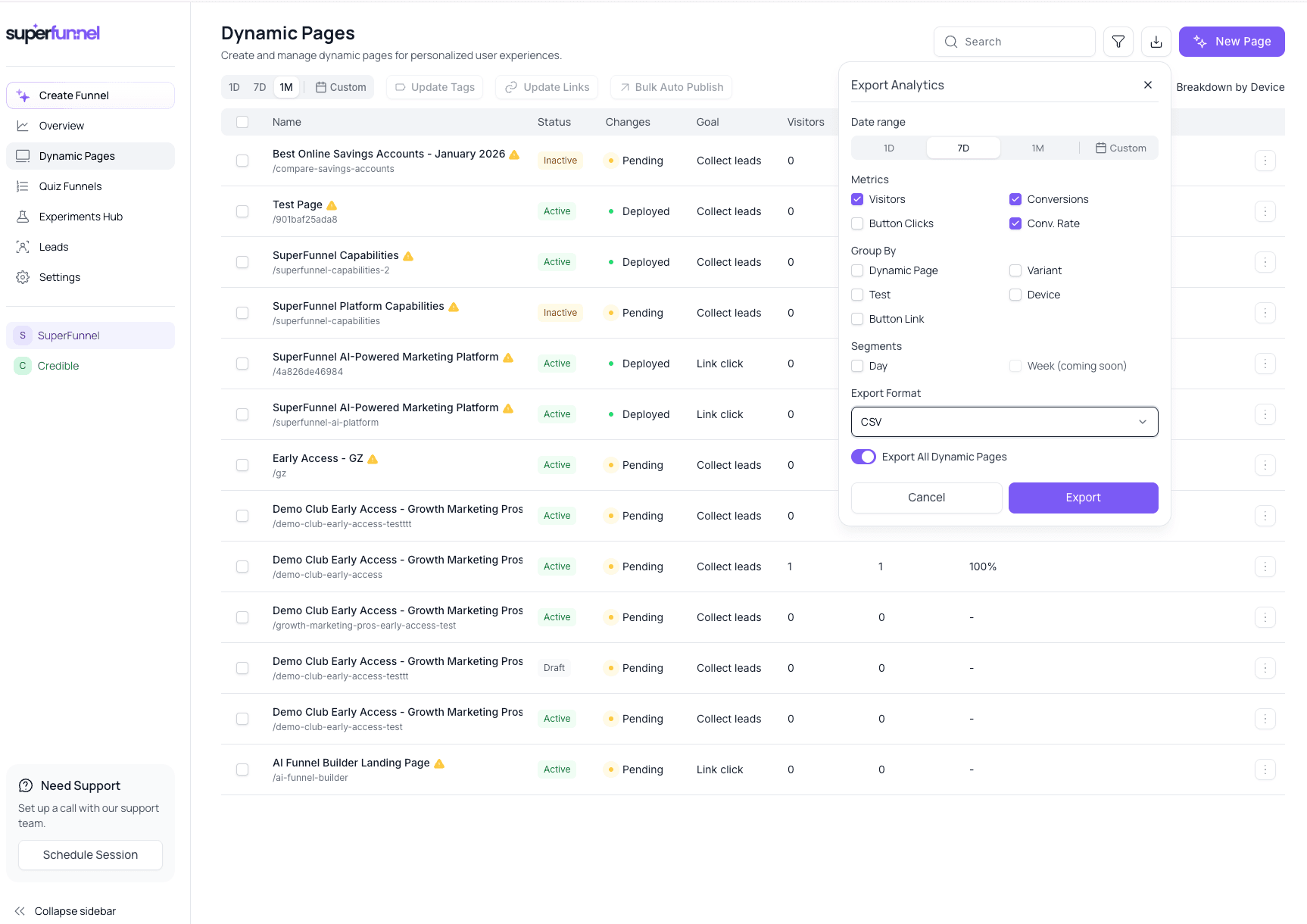
Step 1: Open Dynamic Pages
-
Go to Dynamic Pages from the left sidebar
-
Click the Export icon in the top-right corner
The Export Analytics panel will open.
Step 2: Select Date Range
Choose the time range for the data you want to export:
• 1 Day
• 7 Days
• 1 Month
• Custom range
Step 3: Choose Metrics
Select the metrics you want included in the export:
• Visitors
• Conversions
• Conversion Rate
• Button Clicks
You can export one or multiple metrics at the same time.
Step 4: Choose How to Group the Data (Optional)
You can group the analytics before exporting.
Available grouping options include:
• Dynamic Page
• Variant
• Test
• Device
• Button Link
Step 5: Choose Export Format
Select the file format you prefer:
• CSV
• JSON
Step 6: Export the Data
-
Click Export
-
Your analytics file will be generated and downloaded